

Where your recipes belong
Every recipe you love, finally in one place. Import from anywhere. Cook with joy. No ads.



Everything You Need
Import from Anywhere
Save recipes from your favorite websites and social media (YouTube and Instagram, more are coming soon) with a single tap. Savr automatically extracts ingredients, steps, and photos.
Beautiful Photos
Add multiple photos to each recipe. Capture the process, the final dish, or inspiration from anywhere.
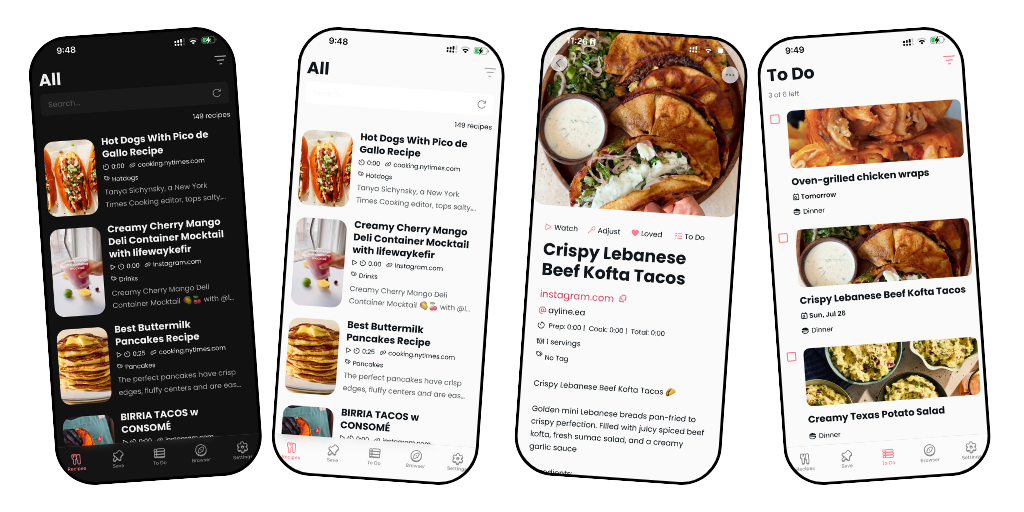
Simple & Clean
A minimalist interface that puts your recipes front and center. No clutter, no distractions, just beautiful cooking.
Swipe to Organize
Effortlessly manage your collection with intuitive swipe gestures. Delete, edit, or favorite recipes in seconds.
Share Seamlessly
Save recipes directly from other apps using the share button. Works with Safari, Chrome, Instagram, YouTube, and other recipe apps.
Light & Dark Mode
Cook comfortably at any time of day with automatic theme switching that's easy on your eyes.
To Do List
✨New Keep a running list of recipes you want to cook next. Check them off as you make them, and never lose track of that dish you've been meaning to try.
Reviews
How It Works
Find a Recipe
Browse your favorite food blogs, social media, or cooking websites.
Save with One Tap
Use the share button or paste the link directly into Savr.
Cook & Enjoy
Access your organized collection anytime, anywhere. Mobile, tablet, and soon web.

In case you`re new here — hi, I`m Sana, and I built Savr. 👋
Savr is a recipe manager app for people who love food but hate losing track of recipes. 🍴
Save recipes from Instagram, YouTube, and most major recipe sites. Take a photo of a cookbook page and import it straight into Savr. Plan your meals for the week with a date and meal type. Keep everything in one place — clean, organised, and always with you. 🩷
Free to download and try — upgrade to Pro for unlimited recipes.
👉 Link in bio.
#recipeapp #recipesaver #mealplanning #homecooking #cookinghacks


Recipes saved and organized in one app 🔖. Cooking with joy ✨!
Give it a try! Download link in Bio. 🩷
#recipeapp mealplanning #recipesaver #homecooking #cookinghacks

All your recipes in one beautiful place
👉 Download link in bio.
#recipeapp #recipesaver #mealplanning #homecooking #kitchenhacks

Savr is free to download on iOS and Android. 🍴
Save recipes from Instagram, YouTube, and most major recipe sites. Snap a photo of a cookbook page. Plan your meals for the week. Keep all your favorite recipes in one place — organized, clean, and always with you. 🩷
Free to download and try — upgrade to Pro for unlimited recipes. ✨
👉 Download link in bio.
#savr #recipeapp #recipesaver #mealplanning #freemobileapp #iosapp #androidapp #appstore #googleplay #foodie #homecooking #kitchenhacks #cookingtips #mealpreptips #recipeideas

Before Savr, my recipes lived everywhere except one place 😅
Bookmarked in my browser. Saved on Instagram. Favorited on YouTube. Tucked away in some other app I`d forgotten I even had.
So I built Savr — one home for every recipe, no matter where it came from 🍳
✨ Save recipes from anywhere — blogs, Instagram Reels, YouTube, photos
✨ Clean, step-by-step layouts built for actually cooking, not scrolling past someone`s life story
✨ 25 recipes free, unlimited with Pro
✨ Made by someone who cooks with it every single week (me!)
If your recipes are scattered across bookmarks in a dozen apps right now, Savr`s ready to be their new home.
Happy cooking 🍳
— Sana
Downlink link in Bio
#recipeapp #mealplanning #homecooking #cookingathome #recipeorganization #foodtech #kitchentools #cookingapp #recipemanager #foodielife #homechef #mealprep #recipecollection #cookingtips #kitchenhacks

Keep forgetting recipes you find online? Savr Recipe Manager keeps them all in one place.
Download link in bio
#RecipeApp #SavrApp #RecipeOrganizer #CookingHacks #FoodieLife #MealPlanning #RecipeManager #HomeCooking #KitchenTech #FoodApp #CookingTips #RecipeCollection #SaveYourRecipes #FoodTech #CookSmart

The 4 stages of not having a recipe app:
Bookmark it 🔖
Forget about it 🥲
Spend 20 mins looking for it 🔍
Just order takeaway 🍕
There`s a better way. Savr 🩷 — Download link in bio.
#savr #recipescanner #cookbooklover #kitchenhacks #cookingtips #recipeapp #recipesaver #cookingtips #mealplanning #foodie

New in Savr: smarter tags 🏷️✨
Start typing, pick from your existing tags, done. No more retyping the same tags recipe after recipe.
Update now and give it a try.
Download link in Bio
#Savr #RecipeApp #CookingApp #MealPlanning #RecipeOrganization #FoodTech #KitchenHacks #CookingTips #HomeCooking #RecipeCollection #AppUpdate #ProductivityHacks #FoodieLife #CookingLife #MealPrep #RecipeSaving #TechForFoodies #CookSmarter #OrganizeYourLife

Savr just got a little refresh. ✨
Introducing the new Savr Recipe Manager logo — clean, warm, and a little more like the app it represents. The pink dot stays. 🩷
Same Savr, looking a little more like itself.
Let me know what you think! 👇
#savr #recipeapp #logorefresh #newlook #brandrefresh #appdesign #mobileapp #recipesaver #indiedev #buildinpublic #designdetails #foodie #mealplanning

New in Savr: Meal Plan To-Do List. ✅
You can now add any recipe to your to-do list, pick a date, and set the meal type — breakfast, lunch, or dinner. 🍳🥗🍝
Your whole week of meals, planned and organized in one place. No guessing, no last-minute "what are we eating tonight?" panic. 😅
Update the app to get it — and let me know what you think! 💬 Link in bio.
#savr #newfeature #mealplanning #recipeapp #mealpreptips #cookinghacks #foodie #mealplan #weeklymealplan #mealplanningmadeeasy #healthyeating #eatbetter #homecooking #cookathome #kitchenorganization #foodplanning #cleaneating #healthylifestyle #mealprepmotivation #sundaymealprep #dinnerideas #lunchideas #breakfastideas #recipeideas #appupdate #iosapp #androidapp #productivity #mealschedule #recipeplanner

Savr is free for your first 25 recipes — no credit card, no trial clock. Just save what you cook and see if it fits your kitchen.
Download link in bio
.
.
#recipeapp #homecooking #foodielife #mealplanning #cookingathome #recipeorganizer #whatscooking

This is why I build. Thank you 🩷
To download, link in bio
#recipeapp #homecooking #foodielife #mealplanning #cookingathome #recipeorganizer #whatscooking #userlove #madeforcooks

Tired of scrolling through 40 "chicken" recipes to find the one that`s also low-carb AND uses your air fryer? I just added AND-filtering to Savr so you can stack tags and actually find what you`re craving. Try it free 🍳
#recipeapp #homecooking #foodielife #mealplanning #cookingathome #recipeorganizer #whatscooking

Level up your recipe reordering 🔀
You can now move entire ingredient groups and step groups before or after each other — great for when you`re reorganizing a whole section, not just individual items.
Update Savr and try it out
Link in Bio
#RecipeApp #CookingApp #RecipeOrganization #MealPrep #CookingTips #FoodTech #KitchenHacks #RecipeManagement #AppUpdate #HomeCooking #KitchenTech #RecipeCollection #CookSmarter #FoodieApp #RecipeFinder #Savr

Got recipes saved in 10 different places? Same.
Savr gives you one home for all of them. Write your own, import from anywhere, and organize with tags so you can actually find what you`re looking for.
Free for up to 25 recipes — no card needed.
Download on iPhone and Android.
Link in Bio
#savr #recipeapp #recipestorage #cookingapp #foodie #homecook #mealplanning #recipeideas #organiserecipes #kitchenessentials

Recipes rarely come out perfectly organized on the first try 📝
Now you can move ingredients and steps between groups — restructuring your sauce vs. filling vs. topping without rebuilding the recipe from scratch.
Your recipes, your structure.
Link in bio.
#RecipeApp #CookingApp #RecipeOrganization #CookingTips #MealPrep #FoodTech #KitchenHacks #RecipeManagement #AppUpdate #HomeCooking #KitchenTech #RecipeCollection #CookSmarter #FoodieApp #RecipeFinder

Filter smarter, not harder 🏷️
You can now combine tags with AND — select Mediterranean + Vegetarian (or Dinner + Chicken) and see recipes that are both, not just recipes with either tag.
No more scrolling through everything tagged Vegetarian hoping it`s also Mediterranean. Just the exact match you`re looking for.
Update Savr and try it out 👇
Link in Bio
#RecipeApp #CookingApp #MealPlanning #RecipeOrganization #FoodTech #CookingTips #RecipeManagement #AppUpdate #HomeCooking #KitchenTech #RecipeCollection #CookSmarter #FoodieApp #MealPrep #RecipeFinder

Found a recipe in a cookbook or magazine you want to keep forever? 📖
Just take a photo and let Savr scan it. It`ll pull the ingredients and steps straight from the image into your collection — no typing required.
Keep your favorite recipes forever — no cookbook required. 📸
Download link in bio.
.
#savr #recipescanner #cookbooklover #kitchenhacks #cookingtips #recipeapp #recipesaver #cookingtips #mealplanning #foodie

Save unlimited recipes and cook without interruptions
Download Link in bio
.
.
#savr #recipescanner #cookbooklover #kitchenhacks #cookingtips #recipeapp #recipesaver #cookingtips #mealplanning #foodie

Before Savr: has 200 browser tabs open, 3 recipe books, and a notes app full of links that don`t work anymore 😭
After Savr: organised, calm, actually cooking. 🧑🍳
Link in bio. You`re welcome. 😄
#savr #recipesaver #kitchenlife #cookinghacks #recipescanner #cookbooklover #kitchenhacks #cookingtips #recipeapp #cookingtips #mealplanning #foodie
