

Where your recipes belong
Every recipe you love, finally in one place. Import from anywhere. Cook with joy. No ads.



Everything You Need
Import from Anywhere
Save recipes from your favorite websites and social media (YouTube and Instagram, more are coming soon) with a single tap. Savr automatically extracts ingredients, steps, and photos.
Beautiful Photos
Add multiple photos to each recipe. Capture the process, the final dish, or inspiration from anywhere.
Simple & Clean
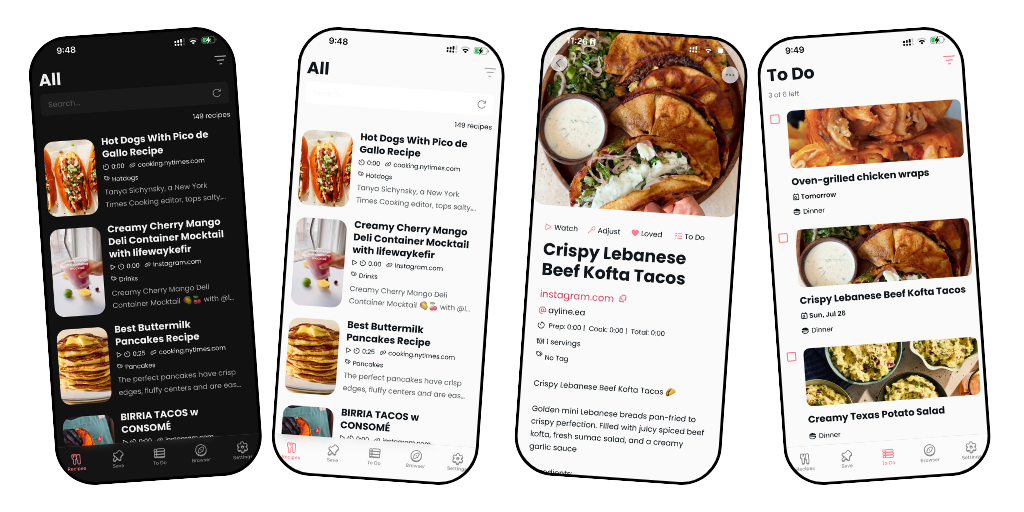
A minimalist interface that puts your recipes front and center. No clutter, no distractions, just beautiful cooking.
Swipe to Organize
Effortlessly manage your collection with intuitive swipe gestures. Delete, edit, or favorite recipes in seconds.
Share Your Recipes
Tap Share on any recipe and send a link by message, email, or any app. Friends can open it without a Savr account, and save a copy to their own collection with one tap.
Light & Dark Mode
Cook comfortably at any time of day with automatic theme switching that's easy on your eyes.
To Do List
Keep a running list of recipes you want to cook next. Check them off as you make them, and never lose track of that dish you've been meaning to try.
Cook Mode
Cook several recipes at once, switch between them with tabs, tick off as you go, scale servings, and view photos or video without leaving the page.
Reviews
How It Works
Find a Recipe
Browse your favorite food blogs, social media, or cooking websites.
Save with One Tap
Use the share button or paste the link directly into Savr.
Cook & Enjoy
Access your organized collection anytime, anywhere. Mobile, tablet, and soon web.

Small but mighty update in Savr today. ✨
🧹 Smarter imports — ingredients and steps are now automatically cleaned up. No more stray bullets, emoji, or empty lines. Recipes are also grouped into sections like “For the sauce” so everything is easier to read and follow.
🔗 Quicker recipe saving in Explore — paste any recipe link into the address bar, tap ✨, and tap +add this recipe. Faster than ever.
Grab the latest update to get it all. 🩷 Link in bio.
#recipeapp #recipesaver #homecooking #cookinghacks #mealplanning


home cook canon event: trying to read step three through a pop-up, losing your place after your screen locks, then cooking from a flour-covered screenshot. Savr Recipe Manager puts every step in clean, ad-free Cook Mode, so your phone helps dinner instead of interrupting it
#SavrRecipeManager #Savr #RecipeManager #SaveRecipes #ImportRecipes #MealPlanning #CookMode #NoAds #MealPrep #RecipeApp

3 reasons your saved recipes keep losing to takeout
When dinner is a decision you have to make while hungry, finding the right screenshot, link, or video feels harder than placing an order
A recipe becomes cookable when its ingredients and steps live together, not when the details are scattered across captions, tabs, and camera-roll photos
The fix isn`t saving fewer recipes, it’s giving the good ones a place you can search, choose from, and open at the stove
Savr Recipe Manager turns recipes from websites, Instagram, and YouTube into one ad-free collection you can actually cook from Use Savr to pick one saved recipe for this week, then open Cook Mode when it`s time to make dinner Which saved dish have you been meaning to cook?
#SavrRecipeManager #Savr #RecipeManager #SaveRecipes #ImportRecipes #MealPlanning #CookMode #NoAds #MealPrep #RecipeApp

I just tried cooking from a food blog and spent 10 minutes closing pop-ups with flour on my hands
Then I opened the same recipe in Savr Recipe Manager and finally saw every ingredient and step without scrolling back through someone`s life story
Savr Recipe Manager has an ad-free Cook Mode that keeps dinner instructions clear when your hands are busy
#SavrRecipeManager #Savr #RecipeManager #SaveRecipes #ImportRecipes #MealPlanning #CookMode #NoAds #MealPrep #RecipeApp

cook to cook, what’s the recipe source that gets you every time, a reel, a YouTube video, or a food blog? mine is importing the link and getting the ingredients, steps, and photo in one recipe card. no more pausing a video 17 times, ur welcome <3
#SavrRecipeManager #Savr #RecipeManager #SaveRecipes #ImportRecipes #MealPlanning #CookMode #NoAds #MealPrep #RecipeApp

Your saved recipes aren`t a recipe collection yet
1. Find Your Recipe Hiding Places Check browser bookmarks, Instagram saves, YouTube history, screenshots, and message threads before you start organizing
2. Give Every Recipe One Destination Move each recipe out of the platform where you found it and into one collection you can search later
3. Save the Details, Not Just the Link A cookable recipe needs ingredients and steps together, so dinner doesn`t depend on reopening a video or caption
4. Use Names You`ll Actually Search Label recipes by what you remember: chicken, 30-minute, pasta, baking, or weekend breakfast
5. Turn Your Saves Into a Dinner List Once every recipe lives together, pick a few you want to cook this week instead of rediscovering them when you`re hungry
#SavrRecipeManager #Savr #RecipeManager #SaveRecipes #ImportRecipes #MealPlanning #CookMode #NoAds #MealPrep #RecipeApp

the 10-minute rule for cooking what you save
pick before hunger choose tomorrow’s dinner while you still have patience, not when everyone is hungry and delivery apps feel easier
check your kitchen only pick saved recipes with ingredients you already own or can grab in one quick stop after work
make it searchable move recipes out of screenshots and into Savr Recipe Manager so dinner ideas appear when you search, not when you scroll
lower the bar you don`t need a perfect cooking night; making one saved recipe this week is how the habit starts
#SavrRecipeManager #Savr #RecipeManager #SaveRecipes #ImportRecipes #MealPlanning #CookMode #NoAds #MealPrep #RecipeApp

If cooking from a recipe makes you scroll more than you stir, try asking yourself these 5 honest questions: Savr Recipe Manager makes the answer a lot calmer
1. When your hands are messy, can you actually see the next step without closing pop-ups or hunting through a food blog?
2. Are you cooking the recipe, or bouncing between screenshots, a caption, and a video paused at the wrong moment?
3. Can you find the ingredient list and instructions in one clean place, or are they buried under endless scrolling?
4. Does your recipe stay open while you cook, or do ads, notifications, and screen timeouts keep interrupting dinner?
5. Would cooking feel easier if every recipe you saved opened in Savr’s clean, ad-free Cook Mode?
#SavrRecipeManager #Savr #RecipeManager #SaveRecipes #ImportRecipes #MealPlanning #CookMode #NoAds #MealPrep #RecipeApp

New Savr update just dropped and this one’s a big one. 🎉
👨🍳 Cook Mode — cook several recipes at once and switch between them with tabs. Tick off ingredients and steps as you go, scale servings, and view photos or the recipe video — all without leaving the page.
📅 To Do got smarter — your meal plan is now grouped into Today, Previous, Upcoming and Anytime, with new filters to help you stay on top of the week.
Plus a few bug fixes and improvements behind the scenes.
Grab the latest update to get it all. 🩷 Link in bio.
#recipeapp #mealplanning #recipesaver #homecooking #cookinghacks #mealpreptips

Something exciting is coming to Savr. 👀
Introducing Cook Mode — cook several recipes at once and switch between them with tabs. Tick off ingredients and steps as you go, scale servings, and view photos or the recipe video without ever leaving the page. 🍳
Coming very soon. 🩷 Follow along so you don’t miss it!
Download link in Bio
#comingsoon #cookmode #recipeapp #mealplanning #kitchenhacks

New in Savr — here`s what just landed. 🎉
🔗 Share your recipes — Tap Share on any recipe and send a link by message, email, or any app. Friends can open it without a Savr account, and save a copy to their own collection with one tap. Changed your mind? Tap Unshare to turn the link off.
✅ Tick off as you cook — Ingredients and steps now have checkboxes so you can mark what`s done and keep your place while cooking. No more losing track mid-recipe!
Update the app to get it — and let me know what you think! 🩷
👉 Link in bio.
#recipeapp #recipesharing #recipesaver #mealplanning #foodie #homecooking

In case you`re new here — hi, I`m Sana, and I built Savr. 👋
Savr is a recipe manager app for people who love food but hate losing track of recipes. 🍴
Save recipes from Instagram, YouTube, and most major recipe sites. Take a photo of a cookbook page and import it straight into Savr. Plan your meals for the week with a date and meal type. Keep everything in one place — clean, organised, and always with you. 🩷
Free to download and try — upgrade to Pro for unlimited recipes.
👉 Link in bio.
#recipeapp #recipesaver #mealplanning #homecooking #cookinghacks

Recipes saved and organized in one app 🔖. Cooking with joy ✨!
Give it a try! Download link in Bio. 🩷
#recipeapp mealplanning #recipesaver #homecooking #cookinghacks

All your recipes in one beautiful place
👉 Download link in bio.
#recipeapp #recipesaver #mealplanning #homecooking #kitchenhacks

Savr is free to download on iOS and Android. 🍴
Save recipes from Instagram, YouTube, and most major recipe sites. Snap a photo of a cookbook page. Plan your meals for the week. Keep all your favorite recipes in one place — organized, clean, and always with you. 🩷
Free to download and try — upgrade to Pro for unlimited recipes. ✨
👉 Download link in bio.
#savr #recipeapp #recipesaver #mealplanning #freemobileapp #iosapp #androidapp #appstore #googleplay #foodie #homecooking #kitchenhacks #cookingtips #mealpreptips #recipeideas

Before Savr, my recipes lived everywhere except one place 😅
Bookmarked in my browser. Saved on Instagram. Favorited on YouTube. Tucked away in some other app I`d forgotten I even had.
So I built Savr — one home for every recipe, no matter where it came from 🍳
✨ Save recipes from anywhere — blogs, Instagram Reels, YouTube, photos
✨ Clean, step-by-step layouts built for actually cooking, not scrolling past someone`s life story
✨ 25 recipes free, unlimited with Pro
✨ Made by someone who cooks with it every single week (me!)
If your recipes are scattered across bookmarks in a dozen apps right now, Savr`s ready to be their new home.
Happy cooking 🍳
— Sana
Downlink link in Bio
#recipeapp #mealplanning #homecooking #cookingathome #recipeorganization #foodtech #kitchentools #cookingapp #recipemanager #foodielife #homechef #mealprep #recipecollection #cookingtips #kitchenhacks

Keep forgetting recipes you find online? Savr Recipe Manager keeps them all in one place.
Download link in bio
#RecipeApp #SavrApp #RecipeOrganizer #CookingHacks #FoodieLife #MealPlanning #RecipeManager #HomeCooking #KitchenTech #FoodApp #CookingTips #RecipeCollection #SaveYourRecipes #FoodTech #CookSmart

The 4 stages of not having a recipe app:
Bookmark it 🔖
Forget about it 🥲
Spend 20 mins looking for it 🔍
Just order takeaway 🍕
There`s a better way. Savr 🩷 — Download link in bio.
#savr #recipescanner #cookbooklover #kitchenhacks #cookingtips #recipeapp #recipesaver #cookingtips #mealplanning #foodie

New in Savr: smarter tags 🏷️✨
Start typing, pick from your existing tags, done. No more retyping the same tags recipe after recipe.
Update now and give it a try.
Download link in Bio
#Savr #RecipeApp #CookingApp #MealPlanning #RecipeOrganization #FoodTech #KitchenHacks #CookingTips #HomeCooking #RecipeCollection #AppUpdate #ProductivityHacks #FoodieLife #CookingLife #MealPrep #RecipeSaving #TechForFoodies #CookSmarter #OrganizeYourLife

Savr just got a little refresh. ✨
Introducing the new Savr Recipe Manager logo — clean, warm, and a little more like the app it represents. The pink dot stays. 🩷
Same Savr, looking a little more like itself.
Let me know what you think! 👇
#savr #recipeapp #logorefresh #newlook #brandrefresh #appdesign #mobileapp #recipesaver #indiedev #buildinpublic #designdetails #foodie #mealplanning
